French version available HERE
Sample project is available just here.
Live Sample Below !
I'm working on AgDatagrid, a really cool open source and free silverlight control from DevExpress (see it in action here). Of course, my goal is to implement a Widget version for PowerShell Dashboard ;-)
I came across a little problem, and we got the same with standard silverlight Datagrid :
How to dynamically build the datagrid ?
AgDatagrid and Silverlight Datagrid use IList type to build the control Datasource. When using managed code (C# or VB.NET in silverlight development), you need to build a Class representing your data to build the IList :
1: public class Person { 2: public string Name { 3: get;
4: set;
5: }
6:
7: public string City { 8: get;
9: set;
10: }
11:
12: public string State { 13: get;
14: set;
15: }
16: }
17:
18: new Person() { 19: me = "Michael Jordan", City="Chicago", State="IL" },
20: new Person() { 21: me = "Kobe Bryant", City="Los Angeles", State="CA" },
22: new Person() { 23: me = "Shaquille O'Neil", City="Miami", State="FL" },
24: new Person() { 25: me = "Patrick Ewing", City="New York", State="NY" }
26:
That's ok when you know what kind of data will be bound to the grid, but how to do this when you have dynamic content ?
I plan to use this grid to represent data coming from PowerShell... So I don't know how many column and type of Data I'll have to implement.
here is the point : I can't use a static class to define my Data in the Silverlight Control.
Game Over ?
Not Yet!
We could follow two path to achieve this :
- Use Dynamic Language programming with Silverlight (ironPython,ironRuby, Managed JScript...) that let us build dynamically the control ?
- Dynamically build the class in managed code ?
Using Dynamic language will be an elegant (and for me the best) way to do it. However, we're dealing with Beta version here, and it's not so easy to use external control and SL2B2 controls in this context (yet), so I won't explain it for now (waiting for the MS Silverlight Team to publish some samples on it ;) )
So, could we dynamically build the Class in our managed code ?
my answer is : YES !
How to generate typed objects dynamically
After some search (HEAVY search should I say), I just found this marvelous thread from Vladimir Bodurov on "how to generated dynamically typed objects in .NET :
http://www.simple-talk.com/dotnet/.net-framework/dynamically-generating--typed-objects-in-.net/
this is it ! Vladimir gives the magic code to build our objects that we could simply implement as a DataSource, without using static Class !
Ok, fine. Let's see now how I used it with AgDataGrid (You can very easily convert this to the standard Silverlight 2 Datagrid, but it's not as cool as DevExpress excellent grid :) )
Ok guys and girls, let's go into the code !
my sample projects is a very basic implementation of this solution in order to let you understand the where abouts.
my Page.Xaml is pretty simple :
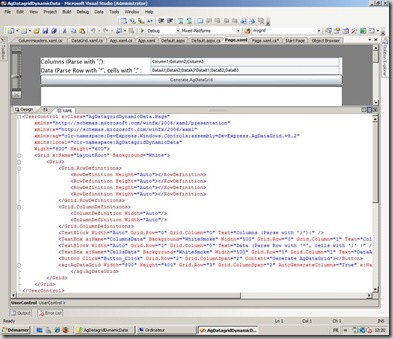
I put 2 textbox (1 for Columns name, 1 for Datas), a button to build the grid, and the AgDatagrid. We could get Datas from outside, but it's another subject. let's keep it simple.
here is the code of the page.xaml :
1: <UserControl x:Class="AgDatagridDynamicData.Page"
2: xmlns="http://schemas.microsoft.com/winfx/2006/xaml/presentation"
3: xmlns:x="http://schemas.microsoft.com/winfx/2006/xaml"
4: xmlns:ag="clr-namespace:DevExpress.Windows.Controls;assembly=DevExpress.AgDataGrid.v8.2"
5: xmlns:local="clr-namespace:AgDatagridDynamicData"
6: Width="800" Height="600">
7: <Grid x:Name="LayoutRoot" Background="black">
8: <Grid>
9: <Grid.RowDefinitions>
10: <RowDefinition Height="Auto"></RowDefinition>
11: <RowDefinition Height="Auto"></RowDefinition>
12: <RowDefinition Height="Auto"></RowDefinition>
13: <RowDefinition Height="Auto"></RowDefinition>
14: </Grid.RowDefinitions>
15: <Grid.ColumnDefinitions>
16: <ColumnDefinition Width="Auto"/>
17: <ColumnDefinition Width="Auto"/>
18: </Grid.ColumnDefinitions>
19: <TextBlock Width="Auto" Grid.Row="0" Grid.Column="0" Text="Columns (Parse with ';'):" />
20: <TextBox x:Name="ColumnsData" Background="blackSmoke" Width="500" Grid.Row="0" Grid.Column="1" Text="Column1;Column2;Column3"></TextBox>
21: <TextBlock Width="Auto" Grid.Row="1" Grid.Column="0" Text="Data (Parse Row with '*', cells with ';' :" />
22: <TextBox x:Name="CellsData" Background="blackSmoke" Width="500" Grid.Row="1" Grid.Column="1" Text="DataA1;DataA2;DataA3*DataB1;DataB2;DataB3"></TextBox>
23: <Button Click="Button_Click" Grid.Row="2" Grid.ColumnSpan="2" Content="Generate AgDataGrid"></Button>
24: <ag:AgDataGrid Width="800" Height="400" Grid.Row="3" Grid.ColumnSpan="2" AutoGenerateColumns="True" x:Name="mygrid">
25: </ag:AgDataGrid>
26: </Grid>
27: </Grid>
28: </UserControl>
All is in the page.xaml.cs, let's study it.
I only use data from the Textbox in the silverlight Control (you can pass data from another source, but we'll see that later in my PowerShell AGDatagrid widget for example).
I use simple text parsing to build the grid :
- column are parsed with ";"
- Datas are parsed with "*" for each row, and in each row I parsed the cell with ";"
Of course, using XML definition would be more powerfull, but I keep it simple for this example. For example :
Column :
Column1;Column2;Column3
Data :
DataA1;DataA2;DataA3*DataB1;DataB2;DataB3*DataC1;DataC2;DataC3
First, I put directly the DataSourceCreator Class of Vladimir in the Namespace of my control, without touching anything (this is what a call Magic Code)
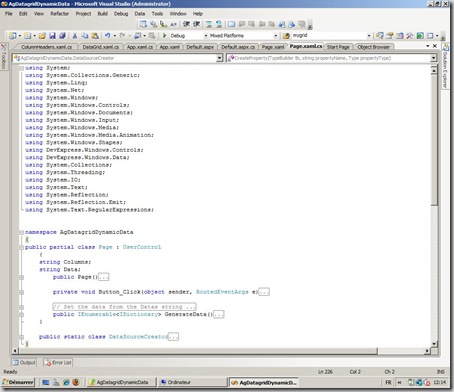
After inserting the code to call the library used by Vladimir's class (using System.Reflection;, etc...), let's defined our main code :
Let's have a look at our main class (UserControl ) :
1: public partial class Page : UserControl
2: { 3: string Columns;
4: string Data;
5: public Page()
6: { 7: InitializeComponent();
8: }
9:
10: private void Button_Click(object sender, RoutedEventArgs e)
11: { 12:
13: mygrid.Columns.Clear();
14: // Adding Columns to the AgDatagrid
15: // With Column type added in the Columns string
16: // we could use a Type checker and setting Column Type
17: // from code behind :
18: // mygrid.Columns.Add(new AgDataGridTextColumn() { FieldName = SingleColumn}); 19: Columns = ColumnsData.Text;
20: Data = CellsData.Text;
21: foreach (string SingleColumn in Columns.Split(';')) 22: { 23: mygrid.AddColumn(SingleColumn);
24: }
25:
26: // Here we set the DataSource with a direct call to the function of
27: // Vladimir
28: mygrid.DataSource = GenerateData().ToDataSource();
29: }
What is done here ?
Nothing special in the public Page() function : We only Initialize the component.
all is in my "Button_Click" function :
1: private void Button_Click(object sender, RoutedEventArgs e)
2: { 3:
4: mygrid.Columns.Clear();
5: // Adding Columns to the AgDatagrid
6: // With Column type added in the Columns string
7: // we could use a Type checker and setting Column Type
8: // from code behind :
9: // mygrid.Columns.Add(new AgDataGridTextColumn() { FieldName = SingleColumn}); 10: Columns = ColumnsData.Text;
11: Data = CellsData.Text;
12: foreach (string SingleColumn in Columns.Split(';')) 13: { 14: mygrid.AddColumn(SingleColumn);
15: }
16:
17: // Here we set the DataSource with a direct call to the function of
18: // Vladimir
19: mygrid.DataSource = GenerateData().ToDataSource();
20: }
first I clear the grid (without It, my function will be an "Add to the grid", not a "build the grid from scratch")
Then We get the value of Columns and Data from the 2 textbox.
After this, we build the column :
1: foreach (string SingleColumn in Columns.Split(';')) 2: { 3: mygrid.Columns.Add(new AgDataGridTextColumn() { FieldName = SingleColumn }); 4: }
I generate only TextColumn type. We could define the column Type in the string and generate appropriate column type in the foreach, but I keep it simple here.
Then we set the Datasource:
1: mygrid.DataSource = GenerateData().ToDataSource();
We call the GenerateData function in the class (I got it from Vladimir Code) :
1: public IEnumerable<IDictionary> GenerateData()
2: { 3: string[] dataSplit = Data.Split('*'); 4: int RowNumber = dataSplit.Count();
5: string[] ColumnSplit = Columns.Split(';'); 6: int ColumnNumber = ColumnSplit.Count();
7: for (var i = 0; i < RowNumber; i++)
8: { 9: string[] cellData = dataSplit[i].Split(';'); 10: var dict = new Dictionary<string, object>();
11: for (var j = 0; j < ColumnNumber; j++)
12: { 13: dict[ColumnSplit[j]] = cellData[j];
14: }
15: yield return dict;
16: }
17: }
The main things here is this :
We declare a new Dictionnary and build it with Key and value :
key is the column name, value is the cell value. Here I dynamically set the column : I just parse the Column strings and use each element as Dictionnary key (dict[ColumnSplit[j]].
that's all !
As you see, it's pretty easy to build my AgDatagrid dynamically.
To go further, you can use XML strings instead of CSV-like format, put the column type in the Column Strings... possibilities are Endless !
Thanks to Azret and the support Team from DevExpress for their help, and thanks to Vladimir Bodurov for this really cool Code snippet !
questions ? Feel free to put comments on this post.
HAVE FUN with Silverlight !


